Productivity tools have become essential for professionals, students, and teams looking to maximize their efficiency in an increasingly demanding digital workplace. Whether you’re managing complex projects, organizing daily tasks, or collaborating with remote teams, the right productivity software can transform how you work and help you accomplish more in less time.
With thousands of productivity applications available today, choosing the right tools can feel overwhelming. From project management platforms and time tracking software to note-taking apps and automation tools, each solution promises to revolutionize your workflow. This comprehensive guide examines the most effective productivity tools, helping you understand which solutions align with your specific needs, work style, and goals.
Drawing from extensive testing and real-world usage across various industries, we’ll explore proven strategies for selecting, implementing, and maximizing productivity tools that deliver measurable results. You’ll learn how to build a productivity system that reduces friction, eliminates distractions, and empowers you to focus on high-impact work.
What Are Productivity Tools?
Productivity tools are software applications, platforms, or systems designed to help individuals and teams work more efficiently by organizing tasks, managing time, facilitating collaboration, and automating repetitive processes. These tools range from simple to-do list apps to comprehensive project management platforms that integrate multiple workflows.
Modern productivity tools leverage technology to address common workplace challenges such as task overload, communication gaps, deadline management, and information silos. They provide structured frameworks for planning, executing, and tracking work while offering insights into how time and resources are allocated.
The evolution of productivity tools has shifted from basic organizational aids to intelligent systems that use artificial intelligence, machine learning, and automation to predict needs, suggest optimizations, and eliminate manual work. Today’s productivity ecosystem includes specialized tools for every aspect of work, from brainstorming and planning to execution and analysis.
Types of Productivity Tools
Task Management Tools
Task management applications help you capture, organize, and prioritize work items. These tools typically offer features like to-do lists, due dates, priority levels, tags, and reminders. Popular options include Todoist, Microsoft To Do, and Things 3, each offering unique approaches to task organization.
Effective task management tools allow you to break down large projects into manageable steps, set dependencies between tasks, and visualize your workload. Advanced features include recurring tasks, natural language input, smart scheduling, and integration with calendar systems.
Project Management Platforms
Project management software provides comprehensive solutions for planning, executing, and monitoring complex initiatives involving multiple team members. Tools like Asana, Monday.com, Trello, and ClickUp offer visual boards, Gantt charts, timelines, and resource allocation features.
These platforms enable teams to collaborate effectively by providing shared workspaces, file storage, communication channels, and progress tracking. They help project managers maintain visibility across all moving parts while ensuring accountability and deadline adherence.
Note-Taking and Knowledge Management
Note-taking applications have evolved into powerful knowledge management systems that help you capture ideas, organize information, and connect concepts. Notion, Evernote, Obsidian, and Roam Research offer different philosophies for storing and retrieving information.
Modern note-taking tools support rich media including images, videos, code snippets, and embedded content. Features like bidirectional linking, tags, search functionality, and templates transform scattered notes into interconnected knowledge bases that grow more valuable over time.
Time Tracking and Analytics
Time tracking tools help you understand how you spend your working hours, identify productivity patterns, and optimize your schedule. Applications like RescueTime, Toggl, and Clockify automatically monitor app usage and website visits or allow manual time entry for specific tasks.
Analytics features provide insights into productive versus distracting activities, peak performance hours, and time allocation across projects. This data-driven approach helps you make informed decisions about schedule adjustments, workload management, and focus optimization.
Communication and Collaboration Tools
Communication platforms like Slack, Microsoft Teams, and Discord centralize team conversations, reducing email overload and enabling real-time collaboration. These tools offer channels for organized discussions, direct messaging, video conferencing, and file sharing.
Integration capabilities allow these platforms to serve as central hubs that connect with other productivity tools, providing notifications, updates, and quick actions without switching between applications. Effective communication tools balance immediacy with focus, offering features like do-not-disturb modes and scheduled messages.
Automation and Integration Tools
Automation platforms like Zapier, Make (formerly Integr8ly), and IFTTT connect different applications and automate repetitive workflows. These tools eliminate manual data entry, synchronize information across platforms, and trigger actions based on specific conditions.
By creating automated workflows, you can ensure consistent processes, reduce errors, and free up time for strategic work. Common automations include data synchronization, notification management, content publishing, and report generation.
Focus and Distraction Blocking Tools
Focus tools help you maintain concentration by blocking distracting websites, apps, or notifications during designated work periods. Freedom, Cold Turkey, and Forest use various approaches including website blocking, app restrictions, and gamification to encourage focused work sessions.
These tools often incorporate techniques like the Pomodoro Technique, which alternates focused work intervals with short breaks. Time blocking features help you dedicate specific periods to deep work, ensuring protected time for challenging tasks that require sustained attention.
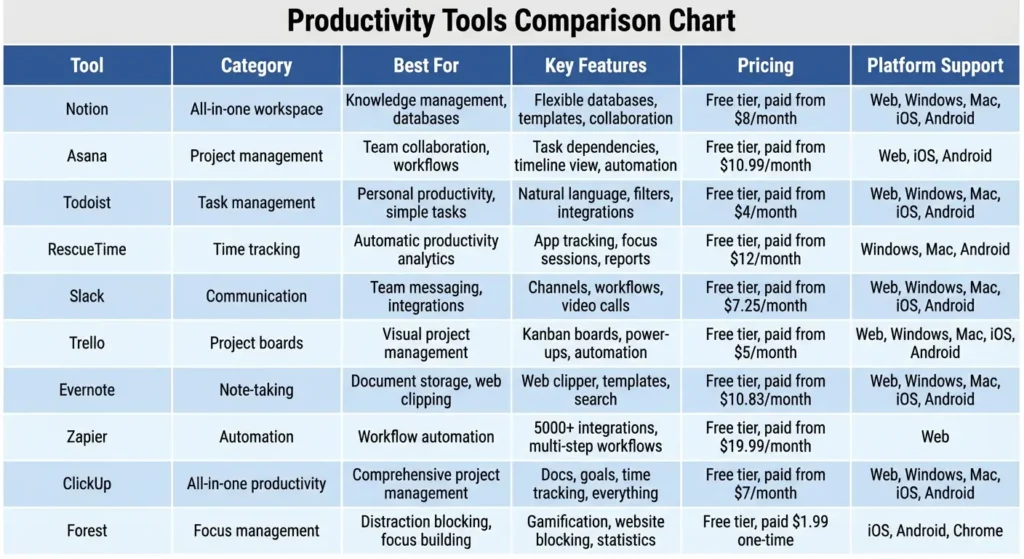
Best Productivity Tools Comparison
| Tool | Category | Best For | Key Features | Pricing | Platform Support |
|---|---|---|---|---|---|
| Notion | All-in-one workspace | Knowledge management, databases | Flexible databases, templates, collaboration | Free tier, paid from $8/month | Web, Windows, Mac, iOS, Android |
| Asana | Project management | Team collaboration, workflows | Task dependencies, timeline view, automation | Free tier, paid from $10.99/month | Web, iOS, Android |
| Todoist | Task management | Personal productivity, simple tasks | Natural language, filters, integrations | Free tier, paid from $4/month | Web, Windows, Mac, iOS, Android |
| RescueTime | Time tracking | Automatic productivity analytics | App tracking, focus sessions, reports | Free tier, paid from $12/month | Windows, Mac, Android |
| Slack | Communication | Team messaging, integrations | Channels, workflows, video calls | Free tier, paid from $7.25/month | Web, Windows, Mac, iOS, Android |
| Trello | Project boards | Visual project management | Kanban boards, power-ups, automation | Free tier, paid from $5/month | Web, Windows, Mac, iOS, Android |
| Evernote | Note-taking | Document storage, web clipping | Web clipper, templates, search | Free tier, paid from $10.83/month | Web, Windows, Mac, iOS, Android |
| Zapier | Automation | Workflow automation | 5000+ integrations, multi-step workflows | Free tier, paid from $19.99/month | Web |
| ClickUp | All-in-one productivity | Comprehensive project management | Docs, goals, time tracking, everything | Free tier, paid from $7/month | Web, Windows, Mac, iOS, Android |
| Forest | Focus management | Distraction blocking, focus building | Gamification, website blocking, statistics | Free tier, paid $1.99 one-time | iOS, Android, Chrome |
How to Choose the Right Productivity Tools
Assess Your Specific Needs
Begin by identifying your primary productivity challenges. Do you struggle with task organization, time management, team collaboration, or information overload? Understanding your pain points helps you prioritize features that address your specific situation rather than adopting tools based solely on popularity.
Consider your work style and preferences. Some people thrive with visual kanban boards while others prefer list-based views. Evaluate whether you need simple, focused tools or comprehensive platforms that handle multiple functions. Your personality, industry, and workflow complexity all influence which tools will feel natural versus frustrating.
Evaluate Integration Capabilities
Modern productivity depends on tools working together seamlessly. Examine how well prospective tools integrate with your existing technology stack. Look for native integrations with platforms you already use like email clients, calendars, cloud storage, and communication tools.
API availability and automation platform support extend integration possibilities beyond built-in connections. Tools that work well with Zapier, Make, or native automation features allow you to create custom workflows that connect your entire productivity ecosystem without manual data transfer.
Consider Learning Curve and Adoption
The most powerful tool is worthless if you or your team won’t use it consistently. Evaluate the learning curve required to become proficient. Simple tools with intuitive interfaces may offer less functionality but ensure higher adoption rates, especially for teams with varying technical skills.
Look for tools with strong onboarding resources including tutorials, templates, documentation, and community support. Consider starting with free trials to test real-world usability before committing to paid plans, especially for team-wide implementations where training time multiplies across users.
Analyze Cost and Scalability
Compare pricing structures across similar tools, considering both current needs and future growth. Some tools offer generous free tiers suitable for individuals or small teams, while others require paid plans for essential features.
Evaluate pricing models including per-user costs, feature-based tiers, and usage limits. Calculate total cost of ownership including potential integration costs, training time, and any required complementary tools. Consider whether the tool scales appropriately as your team or workload grows.
Test Security and Data Privacy
For productivity tools handling sensitive information, examine security features including encryption, two-factor authentication, access controls, and compliance certifications. Review privacy policies to understand how your data is collected, stored, and used.
Consider data ownership and export capabilities. Ensure you can extract your information if you decide to switch tools later. For team environments, evaluate administrative controls, user permissions, and audit logs that help maintain security across your organization.
Implementing Productivity Tools Effectively
Start with One Tool at a Time
Avoid productivity tool overwhelm by implementing solutions gradually. Choose one high-impact area to address first, master that tool, and establish consistent usage habits before adding additional systems. This focused approach prevents abandonment and ensures each tool delivers value before expanding your toolkit.
Give yourself adequate time to adapt to new workflows. Research suggests it takes an average of 66 days to form new habits, so commit to using a new tool consistently for at least two months before evaluating its effectiveness or considering alternatives.
Customize to Your Workflow
Most productivity tools offer extensive customization options. Invest time upfront to configure settings, create templates, establish naming conventions, and set up automation that matches your specific processes. Customization transforms generic tools into personalized systems that support rather than dictate your workflow.
Regularly review and refine your setup as you discover patterns in your work. What seemed optimal initially may need adjustment as you gain experience with the tool or as your responsibilities evolve. Treat your productivity system as a living framework that adapts to changing needs.
Establish Clear Protocols and Standards
For team environments, define clear guidelines for how tools should be used. Establish naming conventions, folder structures, tagging systems, and communication norms that ensure consistency across users. Documented protocols prevent confusion and make collaboration more efficient.
Create templates for recurring workflows, standardizing how similar projects or tasks are structured. This consistency reduces decision fatigue and allows team members to quickly understand status and find information regardless of who initiated the work.
Schedule Regular Reviews and Maintenance
Productivity systems require ongoing maintenance to remain effective. Schedule weekly or monthly reviews to process captured information, archive completed work, and update priorities. This prevents tools from becoming cluttered digital junk drawers that hinder rather than help productivity.
Conduct quarterly assessments of your entire productivity toolkit. Evaluate whether each tool still serves its intended purpose, provides value worth its cost, and integrates well with your current workflow. Be willing to replace or eliminate tools that no longer meet your needs.
Common Productivity Tool Mistakes to Avoid
Tool Hopping and Shiny Object Syndrome
Constantly switching between productivity tools wastes time and prevents you from fully learning any single system. Each tool requires investment in setup, learning, and habit formation. Jumping to new solutions at the first sign of frustration means never discovering whether initial challenges were tool limitations or user inexperience.
Commit to giving tools adequate time to prove their value before switching. Unless a tool has fundamental flaws that prevent basic functionality, minor inconveniences often have workarounds or diminish as you develop proficiency.
Over-Complicating Your System
More tools and features don’t automatically increase productivity. Complex systems with excessive categories, tags, priorities, and integrations create maintenance overhead that consumes time better spent on actual work. The goal is simplicity that enables action, not elaborate organization that becomes an end unto itself.
Regularly audit your productivity system for unnecessary complexity. If you’re spending more time managing tools than completing work, simplify by eliminating rarely-used features, consolidating tools, or returning to more straightforward approaches.
Ignoring Mobile and Offline Capabilities
Productivity doesn’t happen exclusively at a desk. Tools without robust mobile apps or offline functionality limit when and where you can work. Evaluate mobile experiences during tool selection, ensuring critical features are accessible on smartphones and tablets.
Test offline capabilities to ensure you can access information and continue working without internet connectivity. Sync conflicts and data loss from poor offline support create frustration and undermine trust in your productivity system.
Neglecting Data Backup and Export
Relying entirely on cloud-based productivity tools without backup strategies risks data loss from service outages, account issues, or company closures. Regularly export important data and maintain local copies or backups through alternative cloud storage.
Understand each tool’s data export formats and capabilities before committing significant information. Proprietary formats that lock your data into specific platforms create risk and limit flexibility to switch tools when better options emerge.
Productivity Techniques to Maximize Tool Effectiveness
Time Blocking and Calendar Management
Time blocking involves scheduling specific time periods for different types of work, treating these blocks as non-negotiable appointments with yourself. Use calendar tools to visualize your day, ensuring balanced allocation between deep work, meetings, administrative tasks, and breaks.
Combine time blocking with task management tools by assigning tasks to specific calendar blocks. This creates realistic expectations about what can be accomplished each day and reduces the anxiety of endless to-do lists by anchoring work to available time.
Getting Things Done (GTD) Methodology
The GTD system, developed by David Allen, provides a framework for capturing, clarifying, organizing, and reviewing commitments. Productivity tools support GTD by providing inboxes for capture, projects for organization, contexts for grouping, and review systems for maintenance.
Implement GTD principles regardless of specific tools by maintaining trusted systems for all commitments, processing inputs regularly, organizing by actionable next steps, and conducting weekly reviews. The methodology works with simple text files or sophisticated applications.
Pomodoro Technique for Focus
The Pomodoro Technique uses timed intervals (traditionally 25 minutes of focused work followed by 5-minute breaks) to maintain concentration and prevent burnout. Focus tools and time trackers often include Pomodoro timers, making it easy to implement this proven technique.
Adjust interval lengths based on your work and attention span. Some tasks benefit from longer focus periods (50-90 minutes) while others work better with shorter bursts. Use break time intentionally for rest rather than switching to different work.
Eisenhower Matrix for Prioritization
The Eisenhower Matrix categorizes tasks by urgency and importance, helping you focus on high-impact activities rather than merely reactive work. Use task management tools to tag or categorize items by these quadrants, ensuring daily attention to important-but-not-urgent work that drives long-term success.
Regularly review your task distribution across quadrants. If most tasks fall into urgent categories, examine root causes and consider preventive measures. Productivity tools that show task distribution can reveal patterns and prompt strategic adjustments.
Future Trends in Productivity Tools
AI-Powered Assistance and Automation
Artificial intelligence is transforming productivity tools from passive organizational systems to active assistants that predict needs, suggest actions, and automate decisions. AI features include smart scheduling that finds optimal meeting times, predictive text that speeds writing, and intelligent prioritization that surfaces important tasks.
Future productivity tools will increasingly understand context, learn individual work patterns, and proactively manage routine decisions. Natural language interfaces will allow you to interact with productivity systems conversationally, reducing friction between intention and execution.
Integration and Unified Workspaces
The proliferation of specialized tools has created productivity fragmentation where information and workflows scatter across multiple platforms. The trend toward unified workspaces combines multiple functions (documents, databases, projects, communication) into single environments that reduce context switching.
Tools like Notion, ClickUp, and Coda represent this integration trend, offering flexible platforms that replace multiple single-purpose applications. APIs and no-code automation platforms will continue improving interoperability for users who prefer specialized best-of-breed tools.
Focus on Well-Being and Work-Life Balance
Productivity tools are evolving beyond pure efficiency to consider human factors like stress, burnout, and work-life boundaries. Features promoting well-being include workload analytics that identify overcommitment, automatic do-not-disturb periods, and prompts for breaks and physical activity.
Expect increasing emphasis on sustainable productivity that optimizes for long-term performance and satisfaction rather than maximum short-term output. Tools will incorporate insights from psychology and neuroscience to support cognitive health alongside task completion.
Privacy-First and Open-Source Alternatives
Growing privacy concerns are driving demand for productivity tools that prioritize data security and user control. Open-source alternatives like Obsidian, Logseq, and Joplin offer transparency, data ownership, and freedom from vendor lock-in.
Privacy-focused productivity tools store data locally or use end-to-end encryption, giving users complete control over sensitive information. This trend reflects broader recognition that productivity systems contain valuable intellectual property and personal information deserving protection.
Frequently Asked Questions
What are the best free productivity tools for beginners?
Todoist, Trello, Notion, and Google Workspace offer generous free tiers perfect for beginners. These tools provide core functionality without payment, allowing you to explore productivity systems before committing to paid solutions. Start with one or two tools that address your primary challenges rather than adopting multiple systems simultaneously.
How many productivity tools should I use?
Most people benefit from 3-5 core tools covering task management, calendar/scheduling, note-taking, communication, and one specialized tool for their specific needs. More tools create management overhead and context switching. Focus on deep integration of essential tools rather than shallow adoption of many applications.
Can productivity tools actually make you more productive?
Productivity tools enable better organization, clearer priorities, and reduced cognitive load, but they’re enablers rather than solutions. Effectiveness depends on consistent usage, appropriate tool selection, and alignment with proven productivity principles. Tools amplify good habits but cannot compensate for unclear goals or poor time management fundamentals.
Should I use all-in-one tools or specialized applications?
This depends on personal preference and workflow complexity. All-in-one tools like Notion or ClickUp reduce context switching and integration challenges but may lack depth in specific areas. Specialized tools offer superior features for specific functions but require integration effort. Many users find hybrid approaches work best, combining a central hub with specialized tools for specific needs.
How do I maintain productivity tool discipline?
Build tool usage into existing routines rather than treating it as separate activities. Start and end days with brief tool reviews, process captured items during natural breaks, and set calendar reminders for weekly maintenance. Make tool interaction as frictionless as possible through shortcuts, automation, and mobile access to reduce barriers to consistent use.
What’s the difference between productivity tools and project management software?
Productivity tools typically focus on individual efficiency including task management, note-taking, time tracking, and personal organization. Project management software emphasizes team collaboration, resource allocation, timeline management, and coordination across multiple people. Many modern tools blur these boundaries by offering features for both individual and team productivity.
Are expensive productivity tools worth the cost?
Value depends on your specific needs and how fully you utilize available features. Free tiers often suffice for individuals or small teams with basic requirements. Paid plans justify their cost when advanced features (automation, integrations, collaboration, analytics) deliver measurable time savings or enable revenue-generating activities. Calculate potential time savings and compare against subscription costs.
How can I convince my team to adopt new productivity tools?
Focus on demonstrating value rather than forcing adoption. Start with pilot projects involving willing participants, showcase quick wins and time savings, and gather feedback for addressing concerns. Provide adequate training and support, recognize early adopters, and emphasize how tools solve existing pain points. Top-down mandates without buy-in typically fail; grassroots adoption with leadership support succeeds.n perfect organization. The best productivity system is one you actually use consistently to support meaningful work.
Conclusion
Productivity tools have transformed from simple to-do lists into sophisticated systems that support every aspect of modern work. The right combination of tools can dramatically improve your efficiency, reduce stress, and help you accomplish more meaningful work with less effort. However, success depends not on accumulating tools but on thoughtfully selecting, implementing, and maintaining systems aligned with your specific needs and work style.
As you build your productivity toolkit, prioritize simplicity and consistency over complexity and perfection. Start with foundational tools that address your most significant challenges, master those systems through regular use, and gradually expand as needs evolve. Remember that the goal is progress on important work, not perfect organization.
Explore different productivity tools through free trials, learn from how others use them, but ultimately customize your approach based on what actually helps you accomplish your goals. Your ideal productivity system should feel empowering rather than burdensome, supporting your best work while adapting to your unique workflow and preferences.